arithmetic Digital Integers Operations games
Integers 4 in a Row: the self-checking game that gets students practicing problems while playing
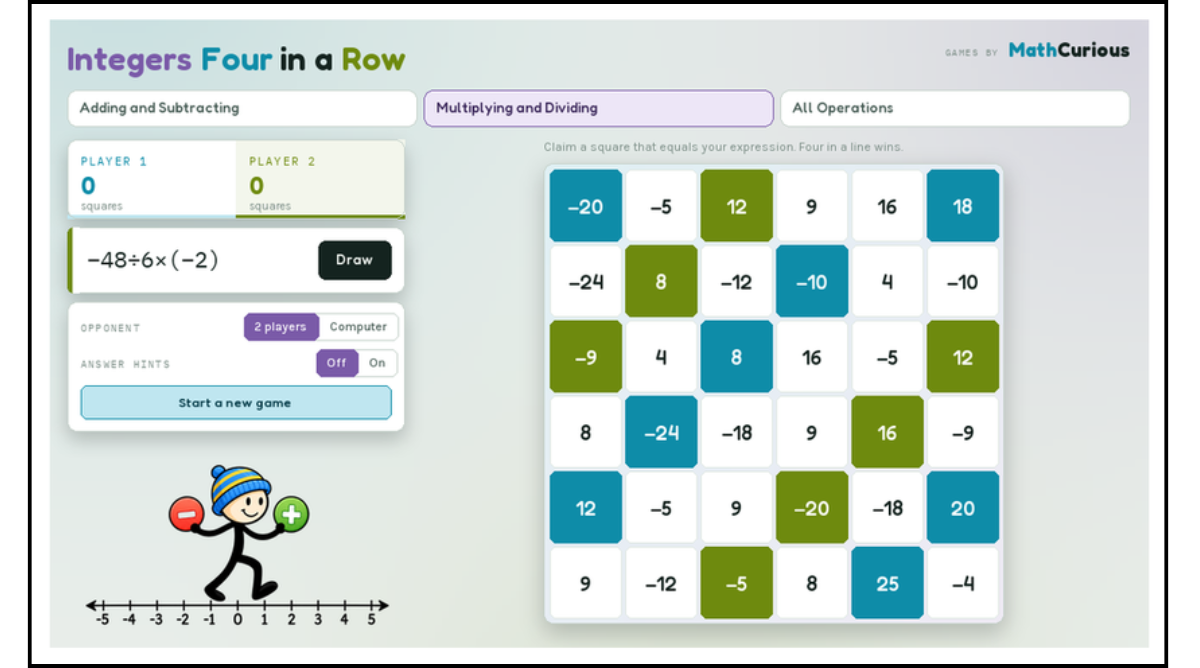
Integers 4 in a Row is a digital, self-checking game that runs in any browser. Students draw an expression, solve it, and claim a square on the board. Four in a row wins.
How it works
1. Draw an expression. The game deals a random card from a deck of 36 — something like 17−(−3)+(−22) or −24÷(−3×2)×2.
2. Work it out. Students solve it in their head or on scrap paper. No typing, no multiple choice.
3. Claim a square. The board is a 6×6 grid of integers. They tap the square that equals their answer.
4. Get four in a row. Across, down or diagonally. First to four wins.
Here's the part that makes it more than a dressed-up worksheet: several squares on the board share the same value. If a student's answer is −20 and there are four squares worth −20, they have to choose which one — the one that extends their line, or the one that blocks their opponent. So every single turn asks for a calculation and a decision. They're scanning the grid, comparing values, and thinking a move ahead.
Three games in one
One link, three decks. Switch between them with a tap.
108 expressions in total, 36 per game. Each deck is shuffled, so no expression repeats until students have worked through all 36.
The All Operations deck is the one to save for last — it mixes order of operations with negative numbers, which is exactly where the two skills collide and fall apart.
Why teachers keep it in rotation
1. It checks every answer, so you don't have to. Correct, and the square fills in with that player's colour. Wrong, and a card appears naming the right value — 7−(−5)−9−3 = 0 — and stays on screen until the student presses Got it. No answer key to hand out. Nothing to mark.
2. Wrong answers become teaching moments instead of dead ends.
Because the correct value is shown immediately, a student who dropped a negative sign finds out in the moment, while they still remember what they did.
3. Students do far more problems than they would on paper. A typical game runs 20–30 expressions between two players. Nobody complains, because they're trying to win.
4. Zero prep. No printing, no cutting, no laminating, no accounts, no logins. Open the link.
5. It differentiates without singling anyone out. An Answer hints toggle shows the answer and highlights the matching squares. Turn it on for a student who needs scaffolding, or for the whole class on day one, and off once they've found their feet. Same game, same board — the support is invisible from across the room.
How to use it
Bell ringer. Put it on the projector and play the class against yourself. Five minutes, and everyone's warmed up. Model your thinking out loud on the first few.
Partner station. Two students, one device, pass-and-play. This is where it shines — they argue about which square to take, which means they're talking about integers.
Early finishers. There's a computer opponent, so a student who finishes early can play solo without needing a partner. It blocks and builds lines, so it's a real game.
Small-group intervention. Hints on. Work through a deck together and talk through each expression before claiming.
Sub plans. The rules are on screen. A substitute needs to say "open this link and play in pairs" and that's the whole instruction.
Homework or at-home practice. Send the link. Students can play a family member or the computer.
Teaching tips
Add a "prove it" rule. Before a student claims a square, their partner has to agree with the reasoning. Turns a race into a conversation.
Play one round as a class first. Model a wrong answer on purpose so students see what the feedback card does — it takes the sting out of getting one wrong later.
Hints on, then off. Day one with hints, day two without. The contrast tells you who's ready.
Use the expression list as an exit ticket. The game includes a reference panel showing all 36 expressions in the current deck. Pick three and ask students to solve them cold.
Talk about the blocking move. "You could have taken either −20 — why that one?" is a genuinely good strategy question, and it makes students re-read the board.
Standards
Aligns with integer operations across grades 6–8:
6.NS.C.5–6.NS.C.7 — understanding positive and negative numbers
7.NS.A.1 — adding and subtracting rational numbers
7.NS.A.2 — multiplying and dividing rational numbers
7.NS.A.3 / 7.EE.B.3 — solving multi-step problems with rational numbers
6.EE.A.2c — evaluating expressions using order of operations
Quick answers
Do students need accounts? No. It's a link. Nothing to sign into, nothing collected.
Does it work on iPads? Yes — and on Chromebooks and laptops. The full board stays on screen.
Can two students share one device? Yes, that's the default mode. There's also a computer opponent for solo play.
Is there anything to print? No. It's fully digital.
Can I use it on an interactive whiteboard? Yes — the board and expressions are large enough to project.
Give it a try
Integer practice doesn't have to mean another worksheet. Give students a board, a reason to care which square they take, and feedback the moment they need it — and they'll work through thirty expressions in a sitting without once asking how many more they have to do.
Find the print versions here